


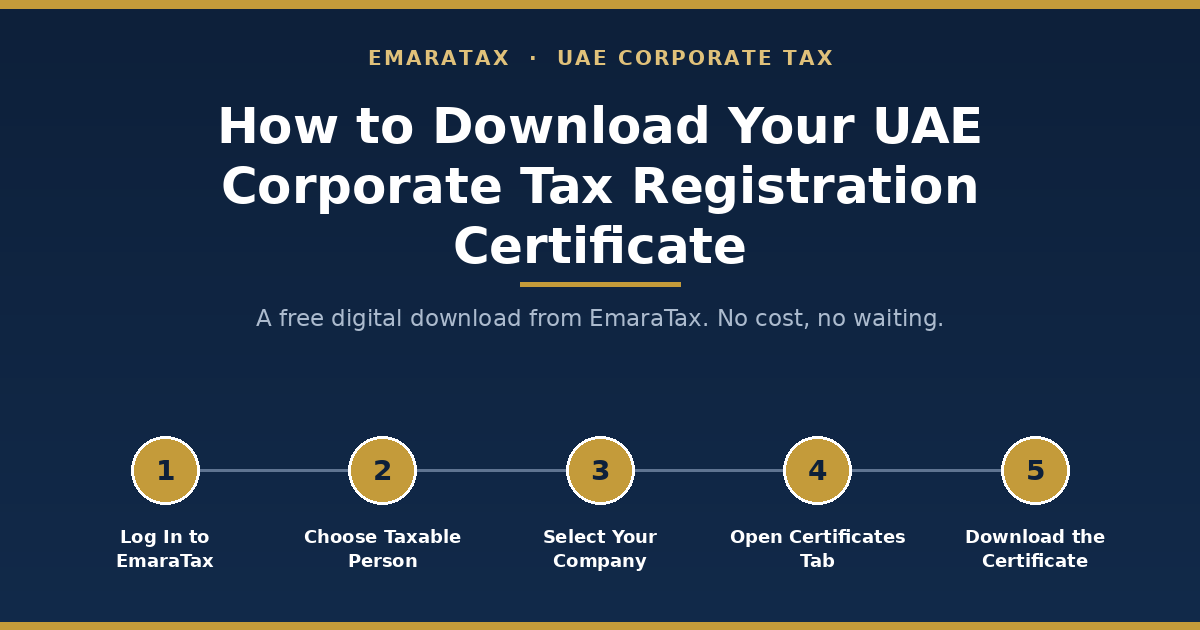
Once your Corporate Tax registration shows Approved on EmaraTax, log in at eservices.tax.gov.ae, select your Taxable Person profile, open Corporate Tax, and download the certificate as a PDF from the Certificates tab. This digital copy is free. The FTA’s own FAQ confirms no payment is required for a soft copy. A separate, paid service (AED 250, about 20 business days, delivered by Emirates Post) exists if you specifically need an FTA-issued hardcopy, and most businesses don’t need this one.
There are two different things people mean when they search this, and mixing them up is the single most common mistake. This guide covers both, tells you which one you actually need, and walks through the exact steps for each, with real screenshots, along with what to do when the certificate isn’t where you expect it to be.
What Is the Corporate Tax Registration Certificate?
It’s the official document the Federal Tax Authority (FTA) issues once your Corporate Tax registration is approved. It confirms your entity is a registered Taxable Person under UAE Corporate Tax law and displays your Tax Registration Number (TRN), a unique identifier used on every subsequent filing, correspondence, and interaction with the FTA.
You’ll typically be asked to produce it when:
- opening or maintaining a UAE business bank account
- applying for a business loan, credit facility, or government grant
- bidding on a government or corporate tender
- renewing a trade licence where the licensing authority requests proof of tax registration
- responding to a due-diligence request from an investor, auditor, or supplier
Who Can Download This Certificate, and Who Needs To?
Any entity or individual registered for UAE Corporate Tax can download this certificate, once approved. That includes:
- UAE mainland companies
- Free zone companies (including Qualifying Free Zone Persons)
- Branches of foreign companies with a UAE Permanent Establishment
- Natural persons (sole establishments/individuals) whose UAE business turnover exceeds AED 1 million in a calendar year. This is the threshold that actually triggers a Corporate Tax registration obligation for individuals, separate from the (lower) AED 375,000 VAT registration threshold that some guides on this topic mistakenly apply to Corporate Tax as well
If you haven’t registered yet, there’s no certificate to download. Registration and approval have to happen first. If you’re unsure whether your entity has an active registration, the fastest way to check is the Registration Status shown on your Taxable Person dashboard, not the certificate itself.
Access matters too. On a shared EmaraTax account, only users with the right role, typically the primary account owner or an added user with the appropriate permission level, can view and download documents for a given Taxable Person. If a colleague set up the registration and you can’t see the certificate, that’s usually a permissions issue on the account, not a problem with the registration.
Before You Start: Prerequisites Checklist
Have these ready before you log in:
- Active EmaraTax account: UAE Pass, or a registered email and password
- Approved Corporate Tax registration: the certificate only becomes available once status shows “Approved,” not “Pending” or “Returned for Amendment”
- Correct Taxable Person profile selected: important if you or your firm manages more than one entity on the same EmaraTax login
- A user role with document access on that Taxable Person’s account
- A stable connection and an up-to-date browser (Chrome or Edge are the most reliable with EmaraTax; clear cache first if you’ve had login trouble before)
Note: None of these prerequisites cost anything. If a step in this process asks you for a payment before showing you a digital certificate, you’ve likely navigated into the paid hardcopy service by mistake. See Path 2 below.
Two Ways to Get Your Certificate: Which One Do You Need?
| Path 1: Free digital download | Path 2: Official hardcopy certificate | |
|---|---|---|
| What it is | A self-service PDF, generated instantly from your EmaraTax account | A physical, FTA-issued certificate |
| Cost | Free | AED 250 |
| Speed | Instant | Up to 20 business days |
| Delivery | Download directly | Mailed via Emirates Post to your registered address |
| Good for | Bank accounts, internal records, most tenders, general compliance proof | Situations where a party explicitly requires an FTA-issued original: some embassies, certain formal/legal proceedings, counterparties who won’t accept a self-printed PDF |
| How the FTA describes it | Confirmed free in the FTA’s own FAQ (“no payment obligation” for a soft copy of a registration certificate) | Listed under the FTA’s “Issuance of Registration Certificates” service |
In practice, almost everyone searching “how to download my corporate tax registration certificate” wants Path 1. Use Path 2 only if a specific counterparty has told you a self-printed PDF isn’t acceptable and they need an FTA-mailed original. Confirm with the FTA or your tax advisor beforehand that this service covers Corporate Tax certificates specifically, since the FTA’s public service page names it primarily in connection with VAT, Excise, and Warehouse Keeper registrations.
Path 1: How to Download Your Free Digital Certificate
Step 1: Log In to EmaraTax
Go to eservices.tax.gov.ae and sign in using either UAE Pass or your registered email and password.
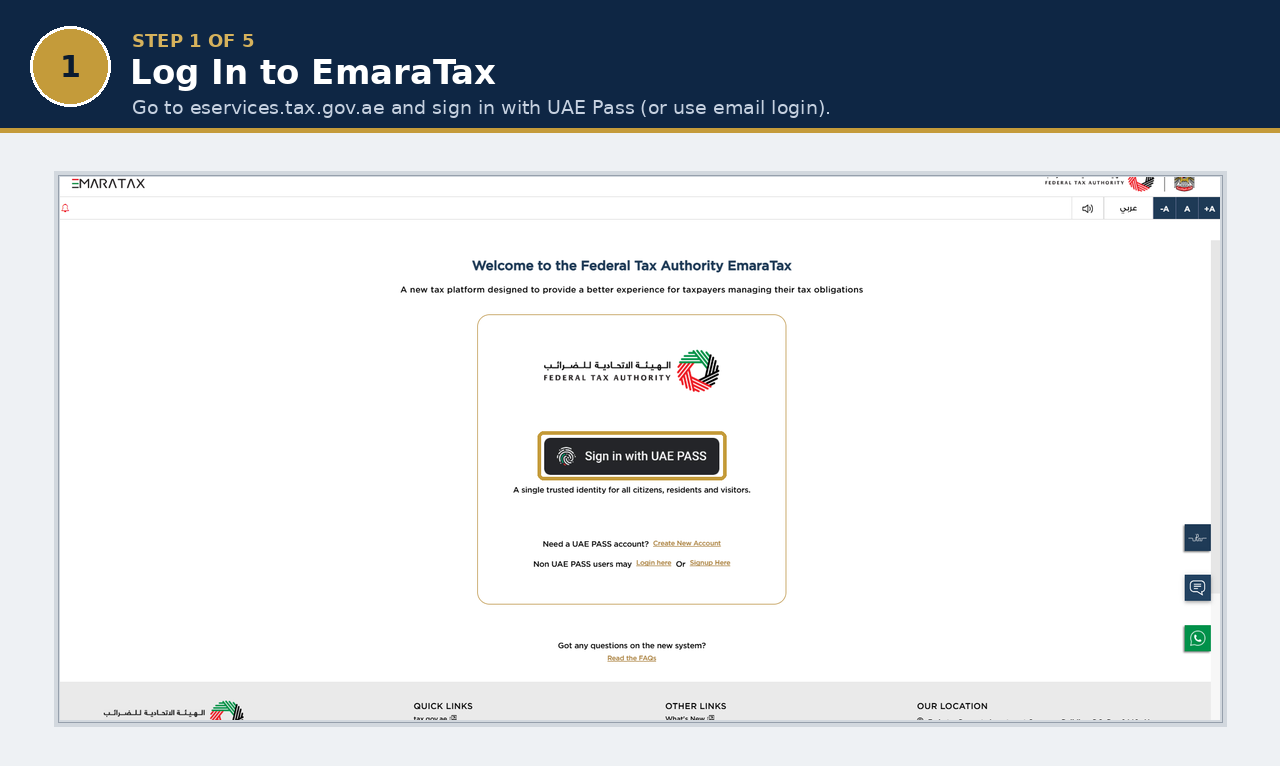
Tip: If you manage more than one Taxable Person, EmaraTax will ask you to select the correct profile after login. Downloading the wrong entity’s certificate is a common, easily-avoided mistake for accounting firms and group finance teams.
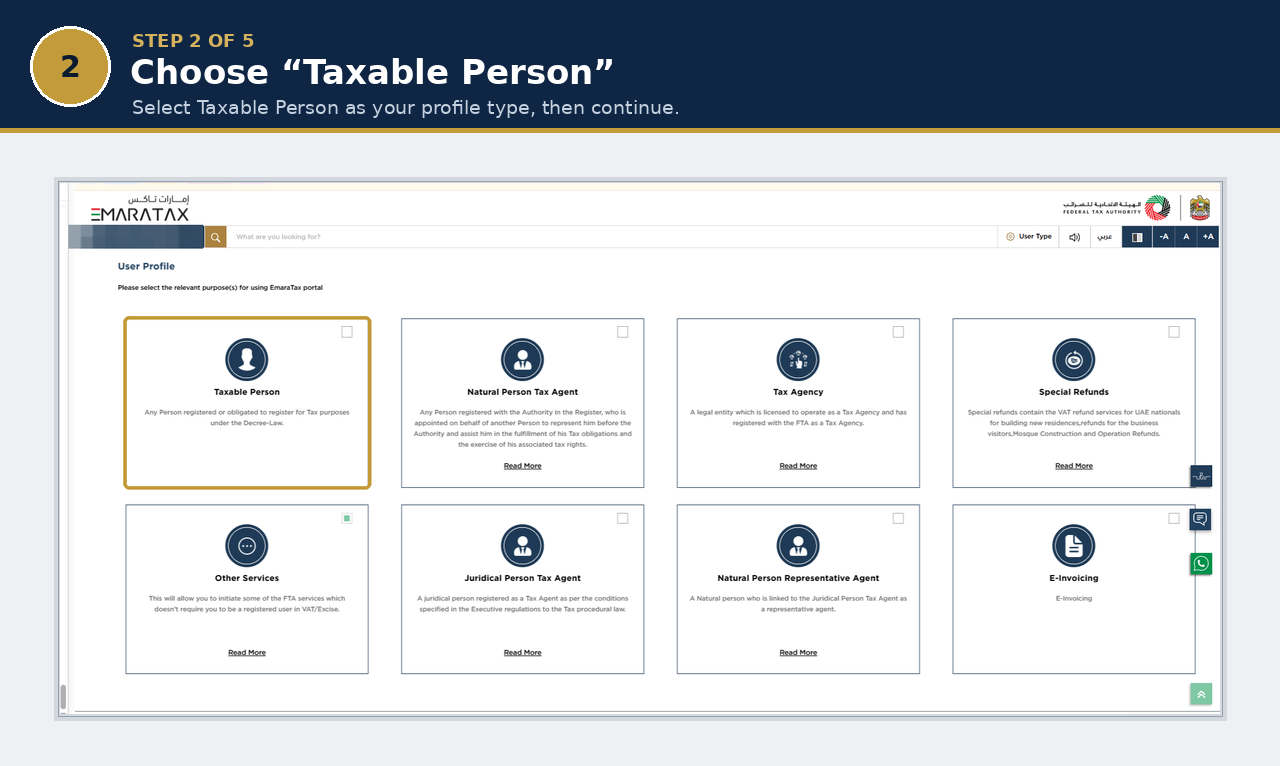
Step 2: Confirm Your Profile Type Is “Taxable Person”
The first time you access EmaraTax, you’ll be asked to select the purpose of your account. Choose Taxable Person. This is the profile type for any business registered, or required to register, for UAE tax. Returning users who’ve already set this up will skip straight past this screen.
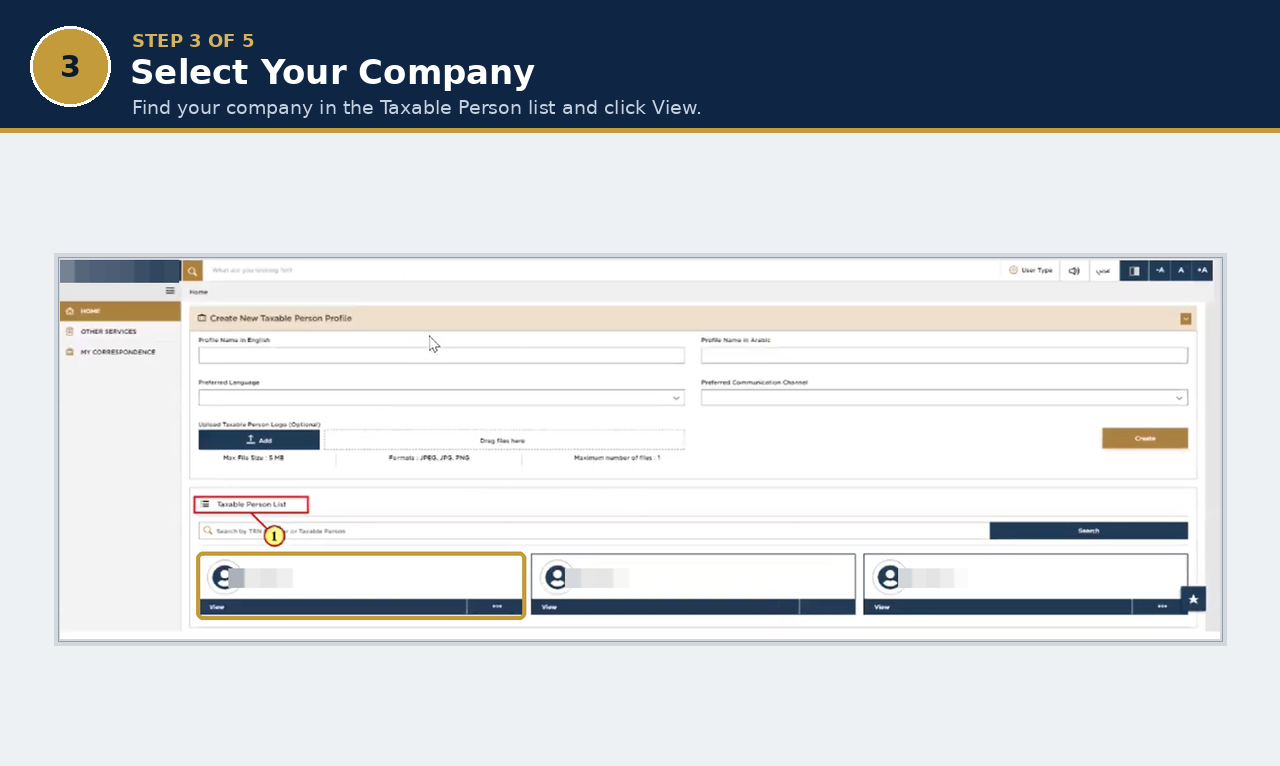
Step 3: Select Your Company from the Taxable Person List
From your dashboard, find your company in the Taxable Person List and click View. If you manage several entities, double-check you’ve picked the right one before continuing.
Step 4: Open Corporate Tax, Then the Certificates Tab
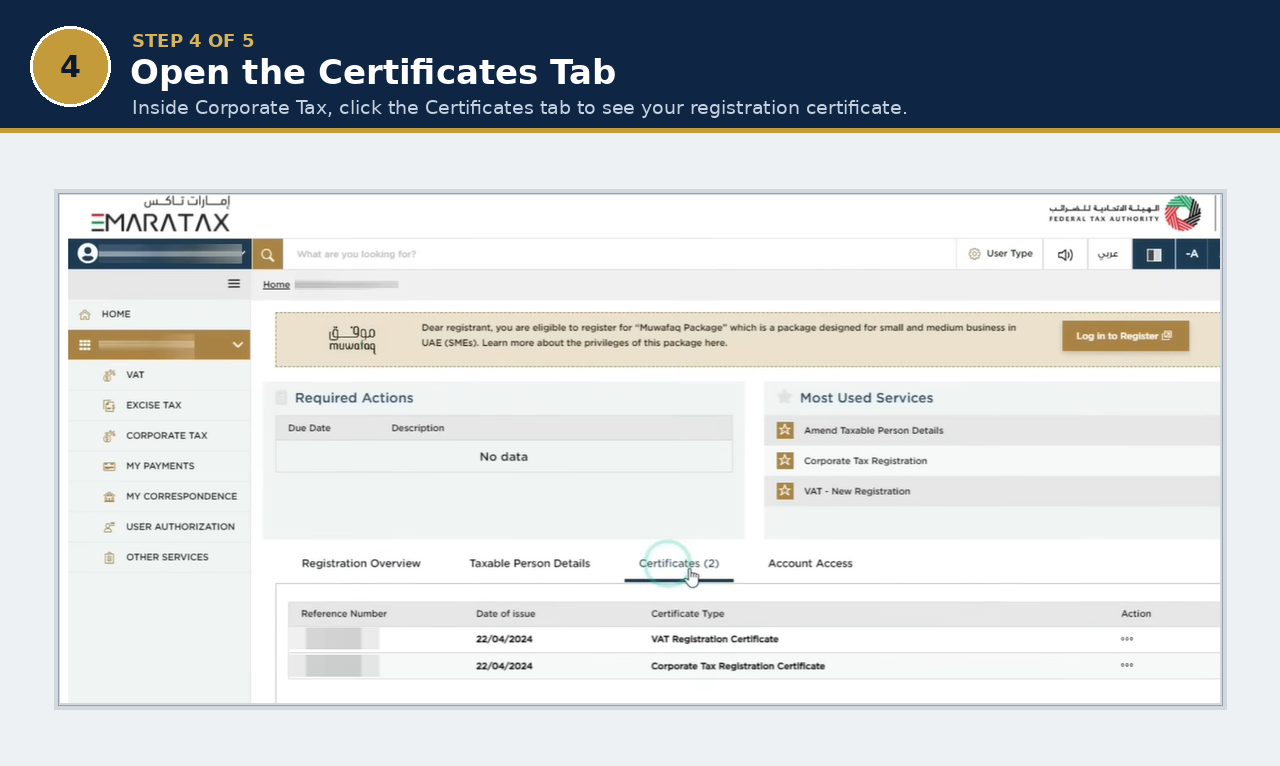
On your Taxable Person dashboard, select Corporate Tax from the left-hand menu. Along the top of the record you’ll see four tabs: Registration Overview, Taxable Person Details, Certificates, and Account Access. Click Certificates. Confirm the Corporate Tax registration status reads Approved. If it still shows “In Review,” “Pending,” or “Returned for Amendment,” the certificate isn’t generated yet (see the troubleshooting table below).
Step 5: Download the PDF
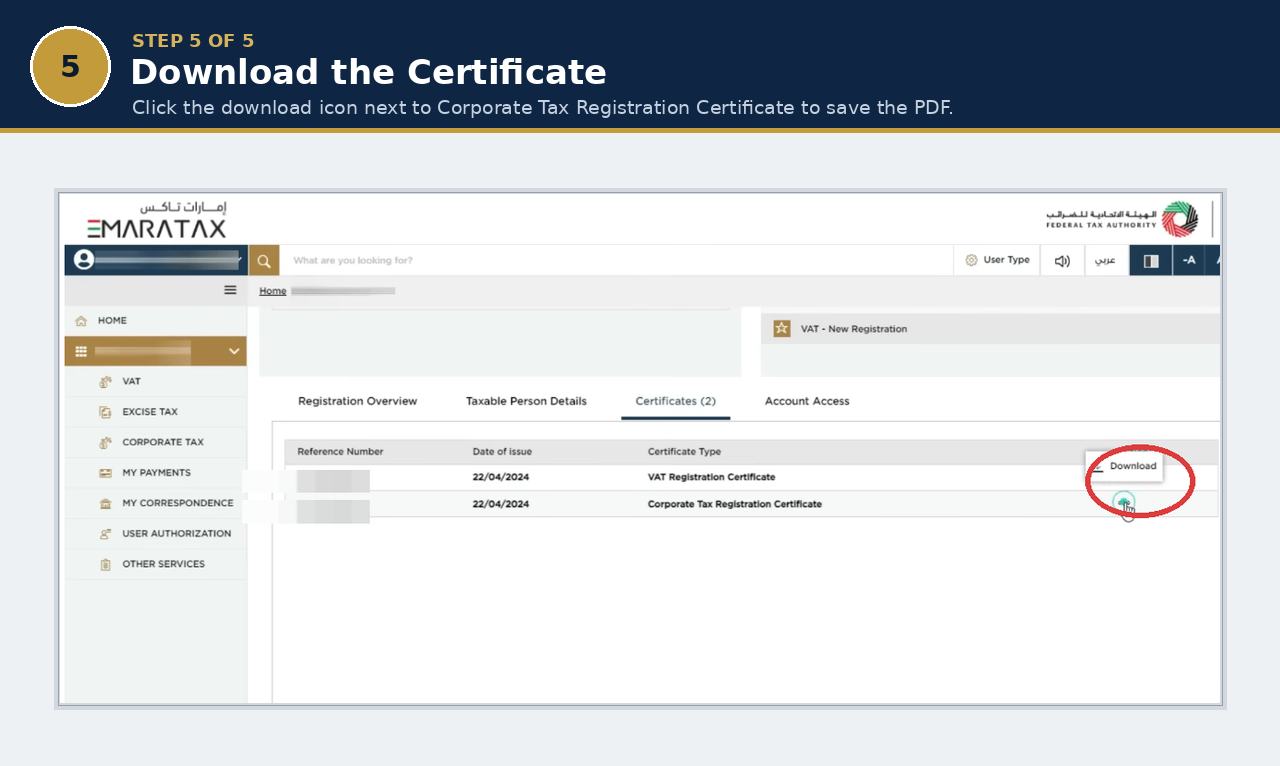
Find Corporate Tax Registration Certificate in the list and click the download icon next to it. It saves as a PDF, ready to print, email, or upload wherever it’s needed.
Before you file it away: open the PDF and check that your legal entity name, TRN, and registration date are correct. If anything’s wrong, don’t just re-download. You’ll need to submit an amendment request first (see “Keeping It Current” below), because the certificate simply mirrors whatever EmaraTax has on file.
Path 2: How to Request the Official Hardcopy Certificate
If you’ve confirmed you specifically need an FTA-issued hardcopy rather than a self-printed PDF:
- From your Taxable Person dashboard, open the Actions menu.
- Select Print Certificate.
- Complete the request and pay the AED 250 fee via the available payment method (Magnati or credit card).
- The FTA processes the request within roughly 20 business days and mails the certificate via Emirates Post to the address registered with the FTA.
No supporting documents are required for this request beyond your existing registration. If your registered address has changed, update it on EmaraTax before submitting the request. Otherwise the certificate goes to your old address.
Troubleshooting: Certificate Not Showing Up?
Match what you’re seeing to the likely cause rather than guessing:
| What you’re seeing | Likely cause | What to do |
|---|---|---|
| No Corporate Tax option under Tax Registration at all | You haven’t started or completed a Corporate Tax registration for this entity | Start registration via Tax Registration → Corporate Tax → New Registration |
| Status shows “In Review” or “Pending” | The FTA hasn’t approved the application yet | Wait for approval. No certificate exists until then. Check status periodically rather than repeating the download attempt |
| Status shows “Returned for Amendment” | The FTA needs corrected or additional information | Resolve the amendment request first. The certificate won’t generate until the application is re-approved |
| Status shows “Approved” but no Certificates tab appears | Often a caching or session issue, or you’re on an older saved bookmark | Log out fully, clear browser cache, log back in and navigate fresh; try a different browser if it persists |
| You can see the registration but not the certificate | Your user role on this account may not have document-access permission | Ask the account owner (or your firm’s EmaraTax administrator) to check your assigned permission level |
| Certificate details are wrong (name, licence number, etc.) | EmaraTax record is out of date | Submit an amendment request to update the record. The certificate will only ever reflect what’s currently on file |
| You’re logged in but can’t find the right entity at all | Wrong Taxable Person profile selected, common with multiple registrations under one login | Switch profiles from the account/profile selector before searching further |
| Forgot password / can’t log in | Standard account access issue | Use “Forgot Password,” or switch to UAE Pass login if you have it set up |
How to Verify a Downloaded Certificate Is Genuine
Because the certificate is a standard PDF, it’s worth knowing how a bank, landlord, or partner can independently confirm it’s real rather than taking it purely on trust. The most reliable method is to have the counterparty verify the TRN printed on the certificate directly against your entity’s registration status through the FTA’s own channels, rather than relying on the PDF alone. A genuine certificate’s TRN will always match an active registration record. If you’re asked to provide extra assurance (for example, for a bank’s KYC process), your tax advisor or the FTA itself can confirm registration status on request.
Keeping It Current: When You Need a New Certificate
The certificate is a snapshot of what EmaraTax holds at the time it’s generated. It doesn’t update itself. You’ll need a fresh copy after:
- a legal trade name change
- a trade licence renewal that changes licence details on file
- a change in registered address
- migrating between Taxable Person profiles (for example, after a corporate restructuring)
In each case, submit the relevant amendment on EmaraTax first, wait for it to be processed, then re-download. The certificate will only ever reflect the current, approved record.
Retention: keep both the certificate and your underlying registration records for the statutory record-keeping period that applies to your Corporate Tax filings, the same period you’re already retaining your accounting records and tax returns for.
FAQs
Is there a fee to download the Corporate Tax Registration Certificate?
What is the difference between this and a Tax Residency Certificate?
How long after approval is the certificate available?
Can I get a hardcopy, and how long does that take?
What if I manage multiple entities or Taxable Person profiles on one EmaraTax login?
Who can access the certificate on a shared EmaraTax account?
Why does my certificate show outdated information?
Need Help With Your Corporate Tax Registration?
If your registration is stuck in review, was returned for amendment, or you’re not sure whether your entity is even correctly registered in the first place, it’s worth getting it resolved before you need the certificate urgently. Our UAE Corporate Tax team can review your registration status, fix amendment issues, and confirm your entity’s Corporate Tax position on EmaraTax. Get in touch if you’d like a hand.
This article reflects EmaraTax’s registration certificate process as confirmed on the FTA’s official website (tax.gov.ae), including the FTA’s own FAQ on soft-copy certificate downloads and its published “Issuance of Registration Certificates” service terms, current as of August 2026. This article is provided for general information and does not constitute tax advice.

Corporate Tax UAE
United Arab Emirates
Tel: +971 4 2500251 | Email:[email protected]