Quick answer: TRN verification in the UAE is free: you can check any Tax Registration Number (TRN) on the Federal Tax Authority (FTA) website. Open tax.gov.ae, select TRN/TIN verification, choose TRN, enter the 15-digit number and the code shown in the image, then click Submit. If the TRN is registered, the FTA shows the business name linked to it. No login is needed.
Checking a TRN takes less than a minute, and it protects your business. A supplier’s TRN appears on every tax invoice, and your right to recover input VAT depends on that invoice being valid. A wrong or fake TRN can leave you paying VAT you cannot reclaim.
This guide explains what a TRN is, how to run a TRN check step by step, how to read the result, and what to do when a TRN does not check out.
What is a TRN in the UAE?
A TRN (Tax Registration Number) is the number the FTA issues to every business or person registered for tax in the UAE. It identifies the registrant in all dealings with the FTA, and VAT-registered businesses must show it on their tax invoices (Federal Decree-Law No. 8 of 2017, Article 79).
The TRN is issued through EmaraTax, the FTA’s online tax platform, when a registration is approved. A business registered for both VAT and Corporate Tax can hold a separate registration number for each, so check which one you have been given.
You will usually find a TRN in three places:
- On a supplier’s tax invoice or credit note
- On the business’s VAT registration certificate
- In the business’s EmaraTax account, under its taxpayer profile
How to verify a TRN on the FTA website: step by step
TRN verification is free, public and needs no EmaraTax account. Follow these four steps.
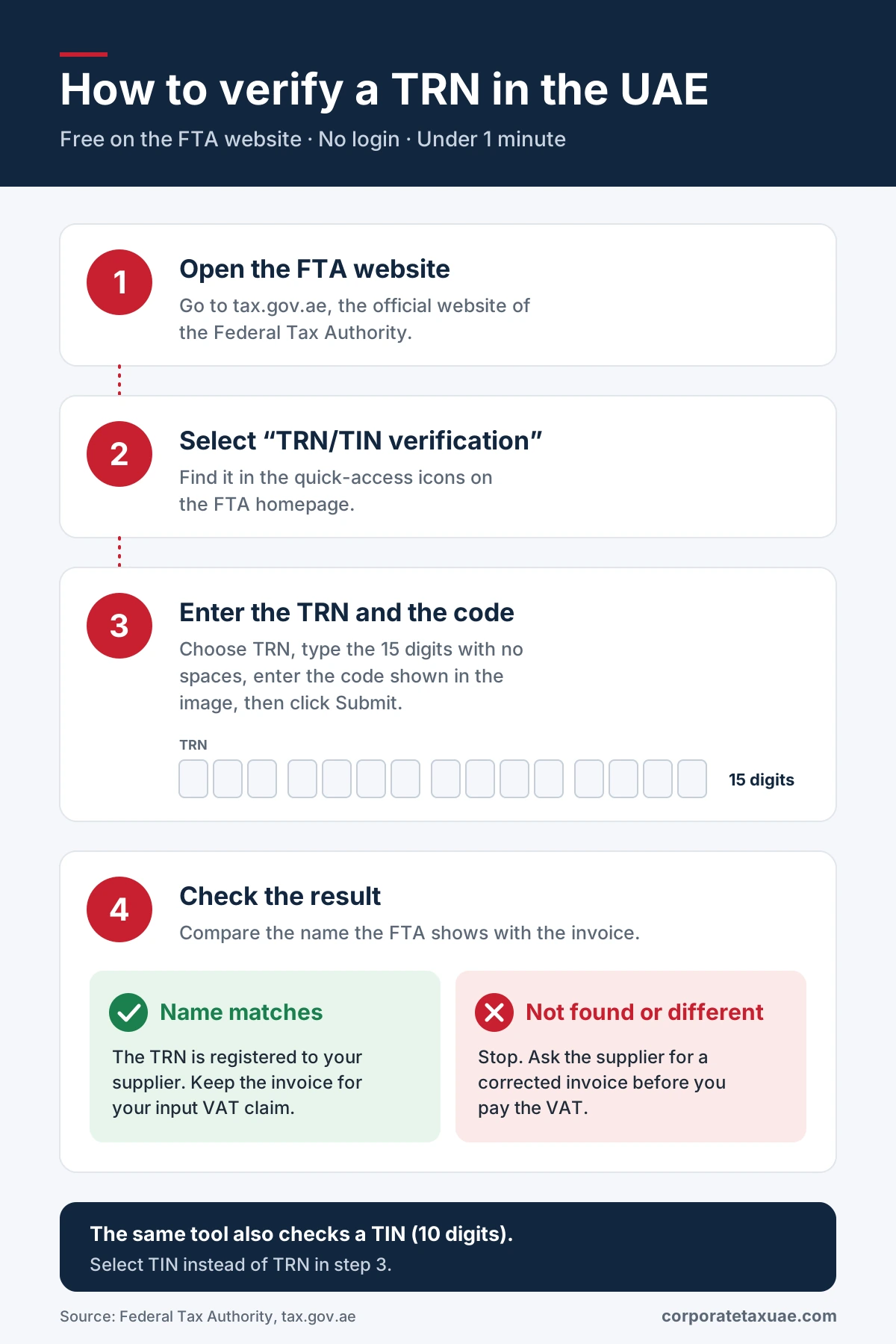
- Open the FTA website. Go to tax.gov.ae, the official website of the Federal Tax Authority. Use the official address only; do not rely on links in emails or messages.
- Select “TRN/TIN verification”. It sits among the quick-access items on the FTA homepage. A verification panel opens on the same page.
- Enter the number and the security code. Choose TRN, type the digits without spaces or dashes, then type the code shown in the image below the field. Click Submit.
- Check the result. Compare the business name the FTA returns with the name on the invoice or contract in front of you.
Tip: Type the number rather than pasting it. Copying from a PDF often adds hidden spaces that make a valid TRN fail.
What the verification result tells you, and what it does not
When a TRN is registered, the FTA shows the name of the business it belongs to. When it is not, the tool reports that the TRN was not found.
| Result | What it means | What to do |
|---|---|---|
| Name shown, and it matches the invoice | The TRN is registered to that business | Keep the invoice with your VAT records |
| Name shown, but it differs from the invoice | The TRN belongs to someone else, or the invoice uses a trading name | Ask the supplier to confirm its legal name and TRN in writing |
| TRN not found | The number is wrong, mistyped or not registered | Re-type it once; if it still fails, ask for a corrected invoice before paying the VAT |
A successful check confirms one thing: the number is registered to the named business. It does not confirm that a specific invoice is genuine, that the supplier charged VAT correctly, or that its tax affairs are up to date. For large or recurring purchases, keep a dated record of each check, such as a screenshot, with your purchase file.
How to find a company’s TRN, and can you search by name?
TRN verification works one way only: you enter a TRN or TIN and it returns a name. It does not let you search by company name to find a TRN.
To get a supplier’s TRN, use one of these routes:
- The supplier’s tax invoice. VAT-registered suppliers must print their TRN on every tax invoice.
- Ask the supplier directly. Request a copy of its VAT registration certificate, which shows the TRN and legal name.
- Your onboarding records. Many businesses collect the TRN and certificate when setting up a new vendor.
Be careful with third-party websites that claim to look up a TRN by company name. They are not FTA services, and their data may be out of date. Always confirm the final number on the FTA tool.
Looking for your own TRN? Log in to EmaraTax and open your taxpayer profile, or check your VAT registration certificate. If you need a fresh copy of the certificate, see our guide to downloading your registration certificate on EmaraTax.
Why you should verify a supplier’s TRN before claiming input VAT
You can recover input VAT only if you hold a valid tax invoice for the supply and have paid the consideration (Federal Decree-Law No. 8 of 2017, Article 55(1)). A tax invoice is only valid if it carries the required details, including the supplier’s name, address and TRN, and your own TRN where you are registered (Executive Regulation, Article 59, as replaced by Cabinet Decision No. 100 of 2025).
So run a TRN verification on the seller before you claim input VAT. The number is not a formality on the invoice; it is one of the conditions that makes your claim stand up. Checking it protects you in four ways:
- Input VAT recovery. An invoice with an invalid TRN may not support the input VAT on it during an FTA review or audit.
- Fraud prevention. A business that is not VAT-registered cannot legally charge VAT. A fake or borrowed TRN is a common sign of an invoice scam.
- Clean records. Correct supplier TRNs make VAT return preparation faster and reduce errors.
- E-invoicing readiness. E-invoices carry both parties’ tax identifiers, so wrong numbers become a bigger problem as the system is phased in from 2027.
Good practice: verify every new supplier’s TRN when you set them up, re-check suppliers you have not used for a year, and record the date of each check. Our article on the rules for a valid UAE tax invoice lists everything else an invoice must contain.
TRN vs TIN: which number are you checking?
The FTA tool accepts both, but they are not the same number.
| Term | What it is | Where you see it |
|---|---|---|
| TRN (Tax Registration Number) | The FTA’s registration number for a taxpayer, issued per tax type (VAT, Corporate Tax, Excise) | Tax invoices, VAT certificate, EmaraTax |
| TIN (Tax Identification Number) | A 10-digit identifier made up of the first 10 digits of your 15-digit TRN | E-invoicing participant identifier |
According to the Ministry of Finance’s e-invoicing field requirements, two practical points follow. A business within the scope of e-invoicing that is not required to register for Corporate Tax must register with the FTA to receive a TIN. And where a business is part of a tax group, its TIN is taken from its own TRN, not from the tax group representative’s TRN.
The distinction matters on the invoice itself. A seller registered for VAT shows its 15-digit VAT TRN in the seller VAT identifier field; a seller that does not have a VAT TRN states its 10-digit TIN in the seller tax registration identifier field instead. A Corporate Tax TRN or any other tax-type-specific TRN is not used in the seller VAT identifier field. The FTA tool checks both types: select TIN instead of TRN in step 3 and enter the 10-digit number.
Need a TRN for your own business? See our VAT registration services or Corporate Tax registration services.
What to do when a TRN fails verification
A failed TRN verification is not always a sign of fraud. Work through these common causes before you reject an invoice.
| Problem | Likely cause | What to do |
|---|---|---|
| “Not found” on the first try | A typing error or hidden space | Type the digits again manually and re-enter the security code |
| “Not found” after re-typing | The number on the invoice is wrong, or the registration has been cancelled | Ask the supplier to confirm its TRN in writing and to send its VAT certificate |
| Name differs from the invoice | The invoice uses a trading name instead of the legal name | Compare with the name on the supplier’s trade licence |
| Name belongs to a different company in the same group | The supplier is part of a VAT group, which reports under one group TRN | Ask the supplier to confirm the group registration in writing |
| Supplier has no TRN at all | The supplier is not VAT-registered | It should not charge VAT; ask for an invoice without VAT |
If the supplier cannot give you a TRN that passes verification, do not pay the VAT element until the issue is resolved. Keep your correspondence on file. If a large amount of input VAT is at stake, ask a tax adviser before you file your return.
Does the e-invoicing deadline change any of this?
E-invoicing raises the stakes for TRN verification rather than changing the rule. Under the phased plan, businesses with revenue of AED 50 million or more must implement e-invoicing from 1 January 2027, businesses below that threshold from 1 July 2027, and government entities from 1 October 2027 (Ministerial Decision No. 244 of 2025, Article 5, as amended by Ministerial Decision No. 66 of 2026). Because e-invoices carry both parties’ tax identifiers and pass through accredited service providers, an incorrect TRN or TIN may cause an invoice to be rejected, rather than simply sitting unnoticed in a filing cabinet.
Frequently asked questions
What is a TRN number in the UAE?
How do I check a TRN in the UAE?
Is TRN verification free?
Do I need an EmaraTax login to verify a TRN?
Can I find a TRN using the company name?
How many digits is a UAE TRN?
Can I verify a TIN on the same tool?
What if a supplier's TRN is invalid but VAT was charged?
Does a valid TRN mean the invoice is genuine?
Need help with VAT registration or supplier checks?
Farahat & Co. helps UAE businesses register for VAT and Corporate Tax, review supplier invoices before VAT returns, and prepare for e-invoicing. If you need help with TRN verification, or with an invoice that has already failed a check, talk to our VAT team.
Related guides:
- VAT registration services in the UAE
- Rules for a valid UAE tax invoice
- How to download your Corporate Tax registration certificate on EmaraTax
- How to apply for a UAE TRN via EmaraTax (Farahat & Co.)
- E-invoicing in the UAE
Official sources:
- Federal Tax Authority – TRN/TIN verification (homepage tool)
- Federal Decree-Law No. 8 of 2017 on VAT – Articles 55 and 79
- Ministry of Finance – UAE Electronic Invoice Mandatory Fields, v1.1 (28 October 2026)
- Ministry of Finance – UAE Electronic Invoicing Guidelines, V2.0 (26 October 2026), section 18.1.1
- Ministerial Decision No. 244 of 2025 – phased implementation (Article 5)
- Ministerial Decision No. 66 of 2026 – amendment to Article 5
- Federal Tax Authority – UAE e-Invoicing
Last reviewed: 2 November 2026. This guide is general information, not tax advice for your situation.